
help to better help you:
Please: add always Joomla / JEM version and details to your posts, so we can try to reproduce your issue!
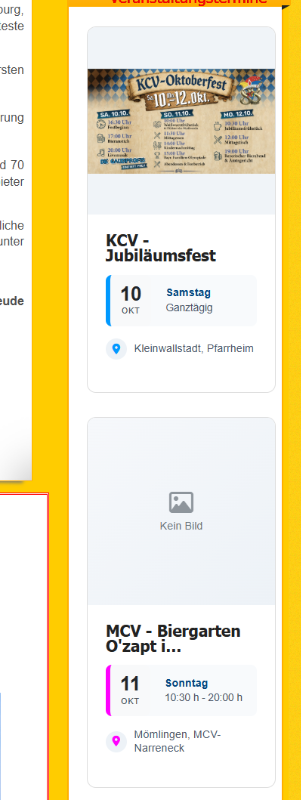
thumbnail is not to displayed on the website


thumbnail is not to displayed on the website
1 week 1 day ago - 1 week 1 day ago
Hallo Experten,
an was könnt es liegen, dass das Vorschaubild auf der Webseite nicht angezeigt wird?
Hello experts,
What could be causing the thumbnail not to appear on the website?
Frontend:
Backend:
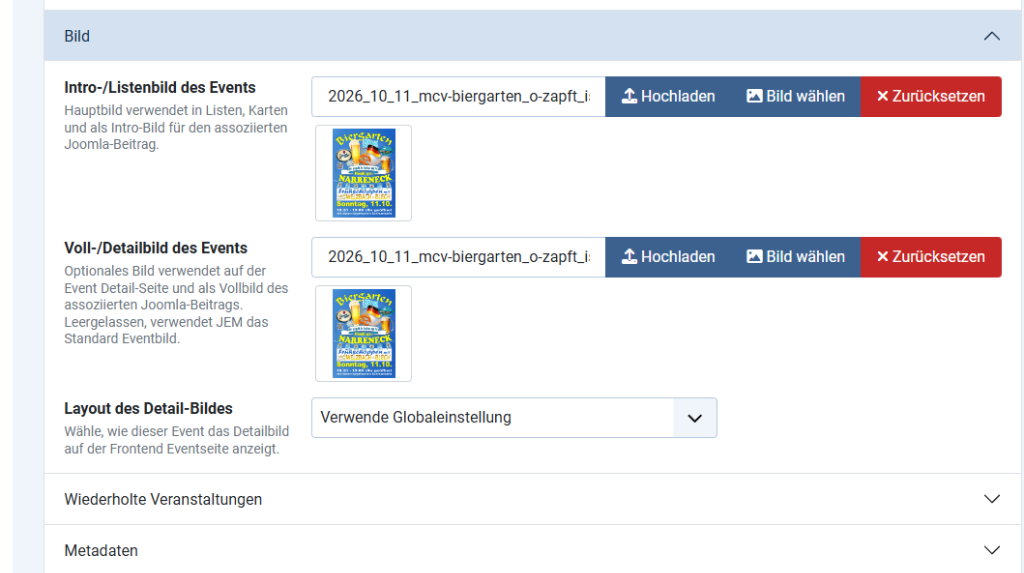
Installed is JEM 5.01, Joomla 6.1.4 and PHP Version 8.3.35
URL: www.kreisnarrenring.de
Thanks for any solution
an was könnt es liegen, dass das Vorschaubild auf der Webseite nicht angezeigt wird?
Hello experts,
What could be causing the thumbnail not to appear on the website?
Frontend:
Backend:
Installed is JEM 5.01, Joomla 6.1.4 and PHP Version 8.3.35
URL: www.kreisnarrenring.de
Thanks for any solution
Last edit: 1 week 1 day ago by Kurtus.
Please Log in or Create an account to join the conversation.


Re: thumbnail is not to displayed on the website
1 week 1 day ago
We checked the image used by the affected event. Its dimensions are 3507 × 4960 pixels, while the current JEM image-processing limit is 3840 pixels on either side. The height therefore exceeds the supported limit, and JEM cannot process it for the module.
The image may have been uploaded through Joomla Media Manager, copied directly to the server, or retained from an older JEM version. This does not mean that the file is corrupted.
Please resize the image so that its longest side is no more than 3840 pixels. For normal website use, we recommend approximately 1920–2560 pixels.
You can replace it by editing the affected event in:
Components → JEM → Events → Edit event → Image
The current file is stored at:
/images/jem/events/2026_10_11_mcv-biergarten_o-zapft_is_a3_216383508.jpg
After replacing and saving the image, please check the JEM module again.
The image may have been uploaded through Joomla Media Manager, copied directly to the server, or retained from an older JEM version. This does not mean that the file is corrupted.
Please resize the image so that its longest side is no more than 3840 pixels. For normal website use, we recommend approximately 1920–2560 pixels.
You can replace it by editing the affected event in:
Components → JEM → Events → Edit event → Image
The current file is stored at:
/images/jem/events/2026_10_11_mcv-biergarten_o-zapft_is_a3_216383508.jpg
After replacing and saving the image, please check the JEM module again.
At the end of the day, computing and technology, like Joomla and JEM are here to help the end user and make our lives a little easier. Help us to be better.
The following user(s) said Thank You: Kurtus
Please Log in or Create an account to join the conversation.
Re: thumbnail is not to displayed on the website
1 week 1 day ago
Thank you very much!
Problem solved.
Best regards
Kurt
Problem solved.
Best regards
Kurt
Please Log in or Create an account to join the conversation.
Time to create page: 0.442 seconds