Configure who can view, create, edit and publish JEM content, and which categories and venues each team may use.
JEM 5.0.1 JEM 5.0.2 Beta 1 JEM 5.1.0 Beta 4
Version scope: the baseline sections describe JEM 5.0.x. The additional permissions and category/venue selection rules are marked 5.1.0 Beta 4. Do not apply the new venue-use instructions to 5.0.2, which does not expose that permission.
Upgrading to 5.1.0? Users who could select venues in 5.0.2 may need an explicit
Use Venue for Events grant. Start with
the migration checklist. This also applies to the
Essential operating profile.
Permission Systems at a Glance
| Mechanism | Purpose | Important distinction |
|---|
| Joomla user groups and ACL |
Grant actions to groups and inherit permissions through the applicable hierarchy. |
A group may be Publisher, Agenda Managers or any custom group. JEM does not require a specific group name. |
| Joomla access levels |
Control visibility of menus and content. |
Being able to view a venue is not permission to edit it or, in 5.1.0, use it for an event. |
| JEM User Control |
Configure frontend creation, editing, ownership and autopublish behaviour. |
Does not grant access to the Joomla administrator. |
| JEM Groups |
Provide frontend rights to users assigned as Maintainers; event rights can be linked to categories. |
These are not Joomla user groups. They do not replace backend ACL. |
| Ownership |
Supports Edit Own checks against the record's stored creator. |
Ownership does not automatically grant publishing, deletion or permission to change the creator. |
| JEM operating profile 5.1.0 |
Determines which product features are available. |
Does not replace user permissions. Essential supports normal venue selection. |
A visible menu item is not an action permission. JEM must also authorise the operation when the user opens its URL directly.
Inherited, Allowed and Denied
- Inherited: use the effective rules from higher levels. It does not mean Allowed.
- Allowed: grant the action, provided an applicable explicit denial does not override it.
- Denied: explicitly block the action. A child group or resource cannot override an applicable inherited denial with Allowed.
Save the configuration and inspect Calculated Setting. Review all Joomla groups assigned to the user, not only one group.
For selective access: leave the parent permission Inherited, with no inherited grant, and allow only the intended groups/resources. Do not deny a parent group such as Registered if its child groups must receive that same permission. In the 5.0.x frontend, also review the separate User Control and JEM Group grant paths described below.
Options: Complete Permission Reference
Open Components → JEM → Control Panel → Options → Permissions. Select a Joomla user group, change only the necessary actions, save, and check the calculated result.
Options contains Joomla ACL. JEM Settings → User Control contains the separate frontend configuration. They are not the same screen.
The tables below cover the complete component-level action list in 5.1.0 Beta 4. Rows marked 5.1.0 are additions relative to the 5.0.2 branch; the remaining rows are part of the 5.0.x baseline.
Administration and General Actions
| Option | Permission | Purpose |
|---|
| Configure ACL & Options |
core.admin |
Manage component permissions and options; JEM treats this as full component control. Do not grant it to a restricted role. |
| Configure Options |
core.options |
Configure JEM settings without granting authority to manage ACL. |
| Access Administration Interface |
core.manage |
Enter JEM in the administrator. Joomla administrator login permission is also required. Resource-specific actions still have their own checks. |
| Create |
core.create |
General creation permission used by applicable legacy frontend paths and category/custom-field workflows. Not a substitute for every dedicated backend Create action. |
| Delete |
core.delete |
General deletion permission used by applicable legacy frontend and category/custom-field workflows. |
| Edit |
core.edit |
General editing permission used by applicable legacy frontend and category/custom-field workflows. |
| Edit State |
core.edit.state |
General publication/state permission where supported. |
| Edit Own |
core.edit.own |
General editing permission for records owned by the user, where supported. |
| Edit Custom Field Value 5.1.0 |
core.edit.value |
Edit Joomla custom-field values subject to the field and record permissions. Does not grant general event or venue editing. |
Events
| Option | Permission | Purpose |
|---|
| Access Events |
jem.events.access |
Open event administration views; not permission to view public events. |
| Create Events |
jem.events.create |
Create events. |
| Delete Events |
jem.events.delete |
Permanently delete events. Publication/trash state is a separate action. |
| Edit Events |
jem.events.edit |
Edit events, subject to applicable resource checks. |
| Edit Event State |
jem.events.edit.state |
Change publication state and supported featured/ordering controls. |
| Edit Own Events |
jem.events.edit.own |
Edit events whose stored creator is the current user. |
| Edit Event Author |
jem.events.edit.created |
Change the recorded creator. Keep separate from ordinary editing. |
5.1.0 Event create, edit, edit-own, state and delete permissions can also be evaluated against the event's JEM categories. See category-scoped permissions.
Venues
| Option | Permission | Purpose |
|---|
| Access Venues |
jem.venues.access |
Open venue administration views; does not by itself grant venue selection in 5.1.0. |
| Create Venues |
jem.venues.create |
Create venues. |
| Delete Venues |
jem.venues.delete |
Permanently delete venues. |
| Edit Venues |
jem.venues.edit |
Edit venues. |
| Edit Venue State |
jem.venues.edit.state |
Change venue publication state and ordering. |
| Edit Own Venues |
jem.venues.edit.own |
Edit venues created by the current user. |
| Edit Venue Author |
jem.venues.edit.created |
Change the recorded venue creator. |
| Use Venue for Events 5.1.0 |
jem.venues.use |
Assign a venue to an event. Can be granted at component level or for individual venues. Does not grant venue editing. |
Categories and Types 5.1.0
| Option | Permission | Purpose |
|---|
| Access Categories |
jem.categories.access |
Open category administration. Category creation/editing still needs the applicable general/category ACL. |
| Access Types |
jem.types.access |
Open type administration. |
| Create Types |
jem.types.create |
Create types. |
| Delete Types |
jem.types.delete |
Delete types. |
| Edit Types |
jem.types.edit |
Edit types. |
| Edit Type State |
jem.types.edit.state |
Change type publication state and ordering. |
Attendees, Notifications and Tools
| Option | Permission | Purpose |
|---|
| Manage Attendees |
jem.attendees.manage |
Manage attendee records through protected administration workflows. Backend event access is also required. This is not the public attendee-name visibility setting. |
| View Registration History 5.1.0 |
jem.registrations.history |
Inspect the registration audit history; does not grant editing of historical records. |
| Manage Notifications 5.1.0 |
jem.notifications.templates |
Manage notification templates, footer and data-protection content. |
| View Notification History 5.1.0 |
jem.notifications.history |
Inspect saved notifications and delivery attempts. |
| Retry and Resend Notifications 5.1.0 |
jem.notifications.resend |
Authorise controlled retries/resends; does not replace the access needed to open the relevant workflow. |
| Manage JEM Tools |
jem.tools.manage |
Use protected maintenance, import/export and other administrative tools. Grant cautiously. |
A permission does not enable a feature disabled by the operating profile. In 5.1.0, notification automation also requires the appropriate profile capability.
Frontend Permissions 5.0.x baseline
Frontend contributors must be logged in. In 5.0.x, Joomla general ACL, JEM User Control and JEM Groups can provide alternative grants. They are not three approvals that must all succeed.
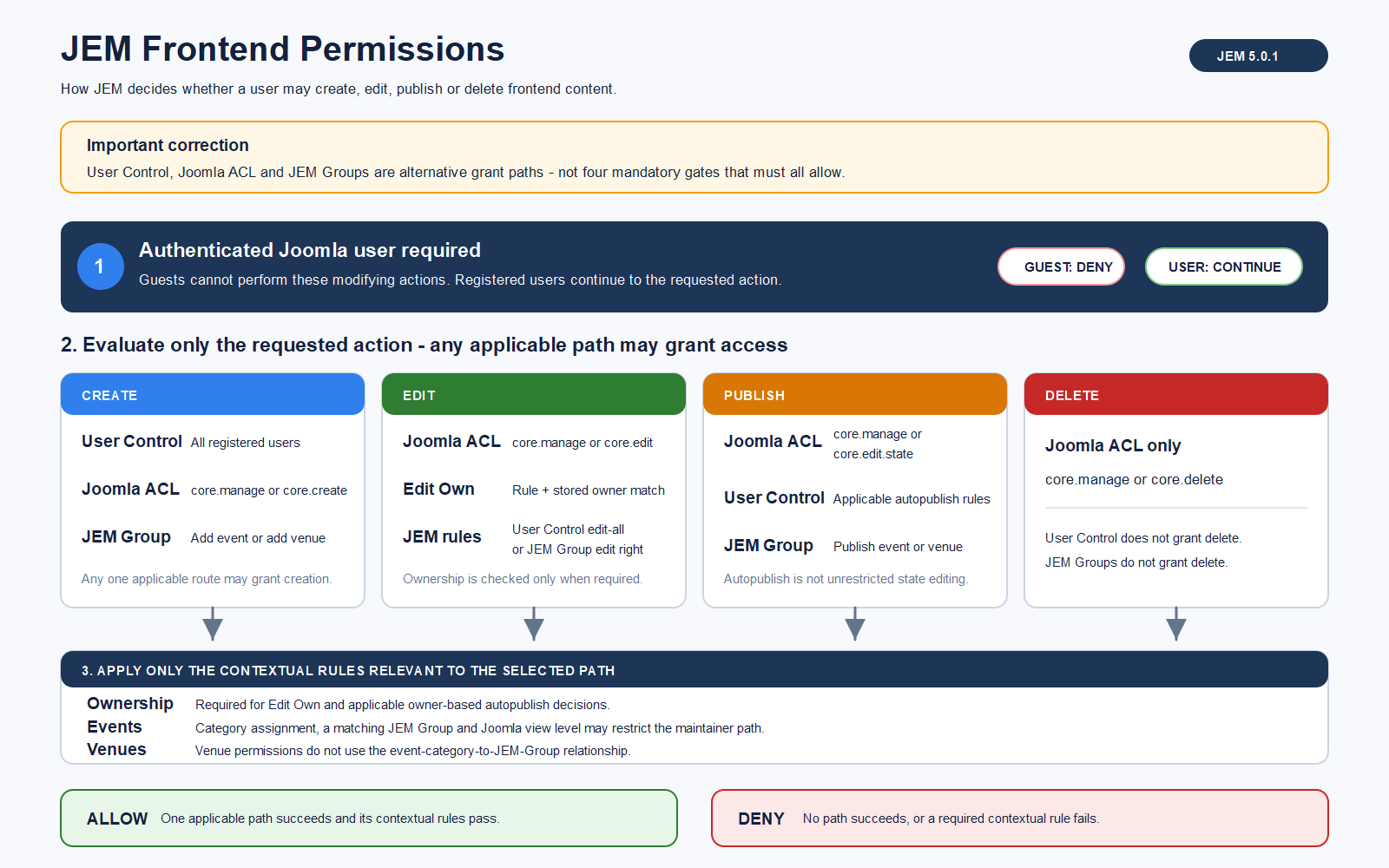 JEM 5.0.1 baseline frontend flow. For 5.1.0, also apply the resource ACL and venue-use rules below; this existing diagram does not include those additions.
- Create: an applicable User Control setting, Joomla general creation/management permission, or a JEM Group Add permission can grant frontend creation.
- Edit: applicable general ACL, User Control, JEM Group or ownership rules may grant editing.
- Publish: edit-state ACL, applicable autopublish settings or JEM Group publication rights govern the action.
- Delete: requires the applicable Joomla deletion/management permission. User Control and JEM Groups do not provide a separate delete grant.
For event submissions, check the selectable published categories, their access levels and any category-to-JEM-Group relationship.
5.0.x caveat: a denial in general Joomla ACL does not necessarily cancel an independent frontend grant from User Control or a JEM Group. Configure all applicable paths consistently. Do not apply this statement unchanged to the dedicated resource ACL introduced into the 5.1.0 frontend.
JEM Groups Are Not Joomla User Groups
Available users are candidates, not members. Move users into Maintainers and save. Enable the required Add, Edit or Publish actions. Assign the JEM Group to the relevant event category when using category maintainer rights. Venue maintainer rights do not use that event-category association.
Example: Submit Events for Review
- Allow the intended users to log in and access the frontend submission menu.
- In Settings → User Control, configure Create Events and Edit Own Events as needed.
- Do not enable autopublishing for those contributors through another applicable path.
- Provide a published, accessible category.
Test that submissions remain unpublished. In 5.1.0: also review dedicated category permissions and grant venue-use permission if contributors must select venues.
Example: Category Maintainers
- Create a JEM Group such as Sports Editors.
- Assign its users as Maintainers.
- Enable the required event actions and assign the group to the Sports category.
- Check the category's access level.
This does not grant backend access. In 5.1.0: dedicated resource ACL can affect the result; use the category-scoped examples below for Joomla-group-based restrictions.
Backend Permissions
A backend user needs Joomla administrator login permission and JEM Access Administration Interface (core.manage). JEM then checks resource access and the requested action. Frontend User Control and JEM Groups do not grant backend access.
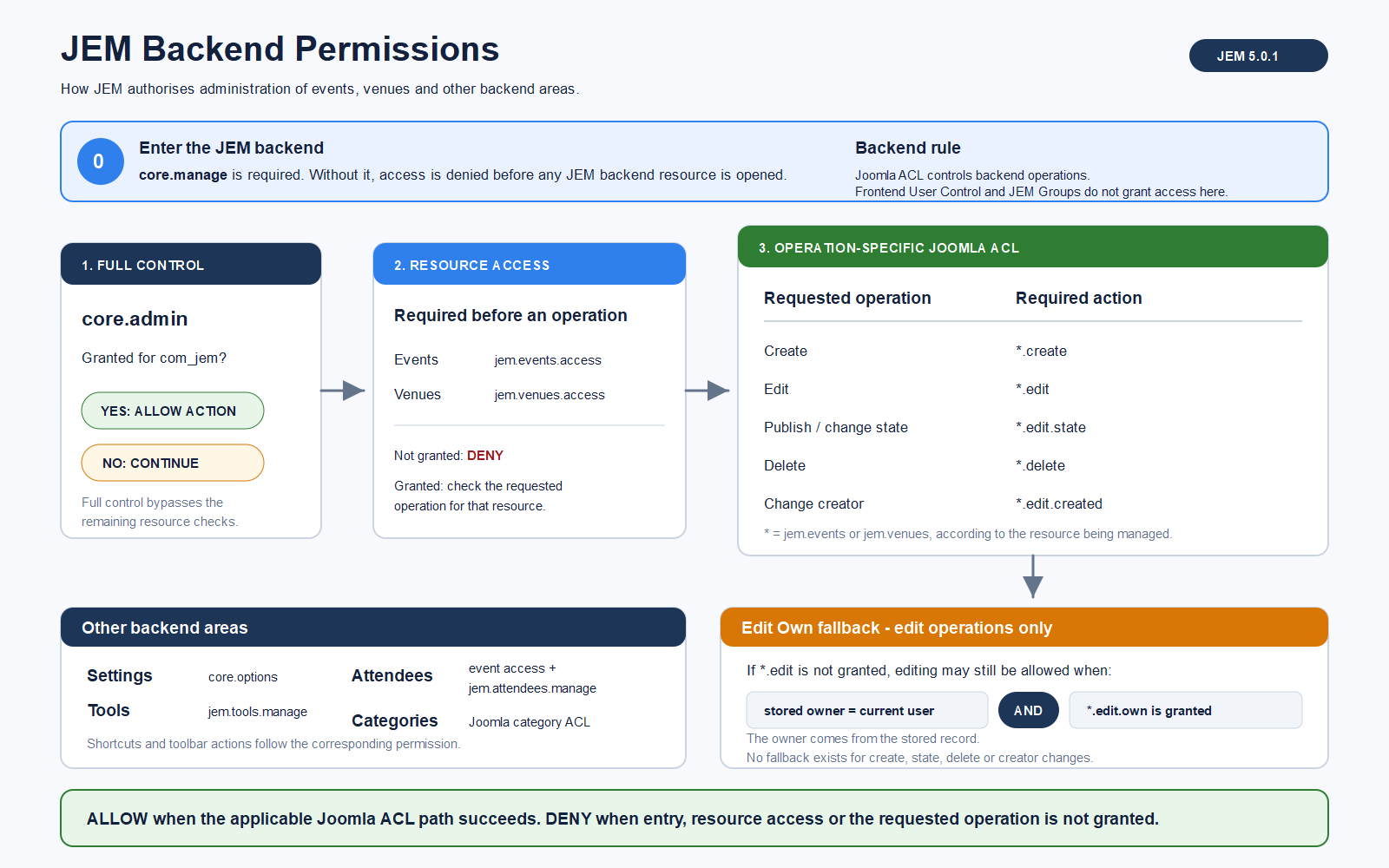 JEM 5.0.1 baseline backend flow. In 5.1.0, event operations also use category-scoped checks and assigning a venue requires venue-use permission.
Configure ACL & Options grants full component control; it is not a shortcut for creating a restricted role. Edit Own compares the stored creator with the current user. Edit Author is deliberately separate.
| Example role | Grant in JEM Options | Keep separate |
|---|
| Event Manager |
Access Administration Interface, Access Events, Create Events, Edit Events, Edit Event State. |
No Delete Events or Edit Event Author unless required. In 5.1.0, check category scope and Use Venue for Events. |
| Venue Manager |
Access Administration Interface, Access Venues, and the required venue create/edit/state actions. |
No event-management permissions unless required. |
| Publication Reviewer |
Access Administration Interface, Access Events, Edit Event State. |
No general event edit/delete grant. Test state changes from the event list. |
| Edit Own role |
Access Administration Interface, resource access, corresponding Edit Own Events or Edit Own Venues. |
Do not also grant general Edit if ownership must limit editing. |
In backend workflows that require opening a venue administration list, check its resource-access permission as well. Do not confuse access to that list with permission to assign a venue to an event.
Category and Venue Permissions 5.1.0 Beta 4
These are additions to the 5.0.x baseline. They apply independently of the Essential/Advanced profile distinction. No special Joomla group name is required.
Category Management Versus Events in a Category
Open JEM → Categories → Edit category → Permissions.
- Create, Delete, Edit, Edit State and Edit Own: category-management actions. Creating a child category is checked against its parent.
- Create Events, Delete Events, Edit Events, Edit Event State and Edit Own Events: actions on events assigned to that category.
Granting permission to create an event in a category does not grant permission to edit the category itself. Access Categories is the separate backend-list access permission.
For events assigned to multiple categories, all applicable category scopes matter. Do not assume that access to one category authorises changes to an event also assigned to another restricted category.
Frontend precedence: JEM first evaluates the dedicated event/venue resource ACL for the requested action, including the relevant ownership path. An applicable explicit denial prevents falling back to legacy grants for that path; an unset decision can still fall back to User Control, general ACL or JEM Groups. Therefore, leaving an action Inherited is not by itself a guarantee that all legacy frontend grants are disabled.
Use Venue for Events
jem.venues.use controls assigning a venue to an event. It is separate from viewing the venue and from creating, editing or publishing it.
| Need | Relevant control |
|---|
| View a published venue |
Publication and Joomla access level, plus the view's applicable visibility rules. |
| Assign a venue to an event |
Use Venue for Events, together with event permissions and selector conditions. |
| Maintain venue records |
Venue create/edit/state permissions; backend resource access when working in administration. |
All eligible venues: grant Use Venue for Events to the intended Joomla group in JEM → Options → Permissions. Individual explicit denials still apply.
Selected venues only: leave the component action Inherited with no inherited grant; open each allowed venue and set Permissions → your group → Use Venue for Events → Allowed.
Do not set the component action to Denied if you want to allow individual venues later. Published/access-level checks, Owned Venues and contextual filters still apply. The permission is also checked when saving; changing a submitted venue ID cannot bypass it.
Practical Examples 5.1.0 Beta 4
Example A: Agenda Managers Can Use All Venues
- Create or use a Joomla group named Agenda Managers. The name is only an example.
- Configure its required event create/edit rights and frontend menu access.
- In JEM Options, allow Use Venue for Events for this group.
- Keep venues published and their access levels available to the group.
- If users should select venues created by other people, set Settings → Global Parameters → Owned Venues to No.
Expected result: the group can assign eligible venues without receiving venue-editing or backend access merely from this permission.
Example B: Culture Editors Use Only Their Categories and Venues
- Create a Joomla group Culture Editors. Check all its inherited permissions and any other groups assigned to its users.
- Avoid broad event grants through JEM Options, User Control or JEM Groups if the role must be category-restricted. Leave parent actions Inherited rather than explicitly Denied where child grants are needed.
- In the Culture category, allow Create Events and the required Edit Events or Edit Own Events action. Grant Edit Event State only if this team should publish.
- Leave unrelated categories without a grant and verify that no legacy frontend path grants access to them.
- Leave component-level Use Venue for Events Inherited with no effective grant.
- Allow Use Venue for Events on the Auditorium and Cultural Centre venues only.
- Check publication/access levels and test with a non-administrator account.
Expected result: the user can work in the authorised category and select the authorised venues. No venue-editing grant is needed. If an event also belongs to a restricted category, test that combined scope separately.
Example C: Venue Managers Do Not Manage Events
Grant venue administration access and the required venue create/edit/state actions. Do not grant event actions unless needed. Maintaining venues does not require granting permission to create events, and event editors can use those venues without becoming venue managers.
Upgrading from 5.0.2 to 5.1.0 Beta 4
Action required: the 5.1.0 installer does not automatically grant jem.venues.use globally. A successful ACL migration creates/repairs the required resource assets; it does not mean every existing editor now has venue-use permission.
- Open the JEM Control Panel and check for an incomplete permission-migration warning. If present, resolve or resume the migration through the authorised administrative workflow before testing resource changes.
- Identify the Joomla groups that actually create or edit events. Do not assume they are all Publisher.
- Choose whether each group may use all eligible venues or only named venues.
- Configure Use Venue for Events at component or venue level accordingly.
- Save and inspect the calculated permission for the group on a sample venue.
- Log in as a representative non-Super-User and test creating and editing an event, selecting a venue and saving it.
- Test a venue that should remain unavailable, if the role is restricted.
No Advanced profile is required. Essential supports ordinary venue assignment. A missing permission should not be worked around by granting Configure ACL & Options, broad venue editing, or an unrelated higher operating profile.
This checklist documents the current behaviour. It does not imply that an automatic upgrade reminder or an ACL-specific empty-selector message has already been implemented.
Recommended Permission Testing
Use a dedicated non-Super-User account for each role. A Super User normally bypasses the restrictions being tested. Testing only button visibility is not sufficient.
| Test | What to verify |
|---|
| Frontend and backend |
Test separately; frontend grants do not imply backend access. |
| Own and other users' records |
Edit Own permits only the correct stored owner. |
| Create, edit, publish, delete |
Each action has the intended result; one grant does not imply all actions. |
| Allowed and restricted categories |
Check creation and existing events, including multi-category events in 5.1.0. |
| Allowed and restricted venues |
Check both selector contents and event saving in 5.1.0. |
| Access levels and ownership filters |
A granted action does not remove these additional conditions. |
| Group inheritance and multiple memberships |
Another membership may affect the effective result. |
| Direct URLs |
Use controlled tests to verify that hidden actions are also protected server-side. |
Log out and back in after group/ACL changes if the session still reflects old permissions.
Troubleshooting
The Venue Selector Says “No Venues Found”
- Clear the search and reopen the selector to remove stale filter/pagination context.
- Confirm the venue exists and is published.
- Check that its Joomla access level includes the user's groups.
- Check Settings → Global Parameters → Owned Venues. If enabled, only venues created by that user are offered.
- 5.1.0: inspect the calculated Use Venue for Events permission for the user's groups on the intended venue.
- 5.1.0: check the Control Panel for a pending ACL migration. Venue selection is blocked while that migration remains incomplete.
- 5.1.0: if editing a child event, check whether the parent event's venue context limits the selection to that venue or its direct subvenues.
If published venues disappeared from this selector immediately after upgrading from 5.0.2, check the new venue-use permission first. An empty list alone does not prove that venue records were deleted.
The Event Form Opens but No Category Can Be Selected
Check publication, access level, JEM Group maintainer membership where applicable, and in 5.1.0 the relevant category-scoped event permission. Check both broad grants and explicit inherited denials.
The User Cannot See a Frontend Submit Action
Confirm login and menu access, then review the applicable event/venue creation path. In 5.1.0, check resource ACL as well as any legacy User Control or JEM Group fallback.
A User Appears under Available Users but Has No JEM Group Rights
Move the user to Maintainers and save the JEM Group. Available Users are not members.
The User Can Enter JEM but Cannot Open Events or Venues
Access Administration Interface permits entry to JEM. The role also needs Access Events or Access Venues for the relevant administration area.
The User Can Edit but Cannot Publish
Edit and change-state permissions are separate. Review the applicable edit-state, frontend autopublish or JEM Group rule, including resource ACL in 5.1.0.
A JEM Group Change Has No Effect in the Backend
This is expected. Configure backend roles through Joomla ACL.
Allowed Still Produces a Denied Result
Save first, then check calculated permissions, parent Joomla groups, component/category inheritance and other group memberships. Do not try to override a higher explicit denial by repeatedly selecting Allowed on a child resource.
Related Documentation
