
help to better help you:
Please: add always Joomla / JEM version and details to your posts, so we can try to reproduce your issue!
JEM Module Teaser - different icon for calendar


JEM Module Teaser - different icon for calendar
9 months 3 weeks ago
Good morning.
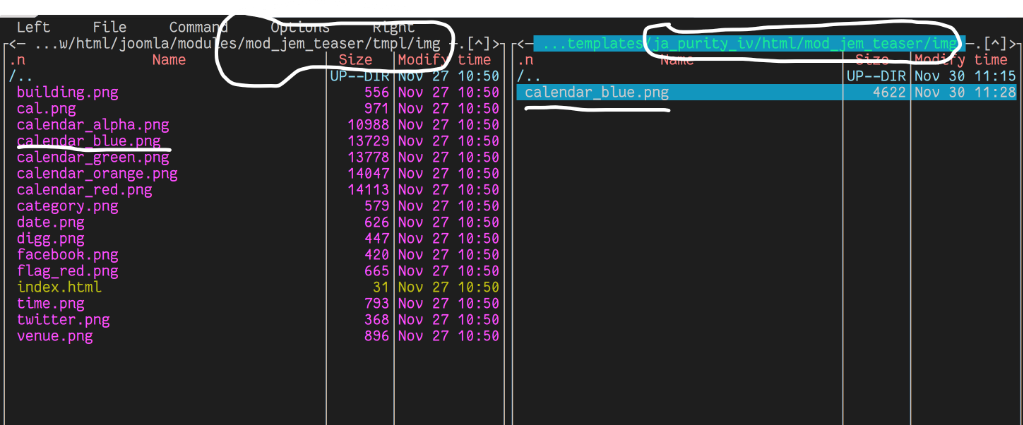
I would like to replace the provided calendar_blue.png with a different one.
Therefore I
- created an override
- copied the new file with same name and owner www-data to the override /img directory
- refreshed the server cache and cleared expired cache (although I dont use cache right now)
- refeshed the browser cache
but still the "old" icon is used.
What do I do wrong?
Versions: Joomla 5, JEM latest
I would like to replace the provided calendar_blue.png with a different one.
Therefore I
- created an override
- copied the new file with same name and owner www-data to the override /img directory
- refreshed the server cache and cleared expired cache (although I dont use cache right now)
- refeshed the browser cache
but still the "old" icon is used.
What do I do wrong?
Versions: Joomla 5, JEM latest
Please Log in or Create an account to join the conversation.


Re: JEM Module Teaser - different icon for calendar
9 months 2 weeks ago
This should work:
Copy the file blue.css into the override folder /templates/YOURTEMPLATE/html/mod_jem_teaser/
Copy your customised calendar image file (calendar_blue.png) into the override folder /templates/YOURTEMPLATE/html/mod_jem_teaser/img/
This way, the override CSS file should be taken instead of the default one and then also the customized image.
(IN addition you can of course also change the file name of the customized image and accordingly also in the override CSS file.)
.
Copy the file blue.css into the override folder /templates/YOURTEMPLATE/html/mod_jem_teaser/
Copy your customised calendar image file (calendar_blue.png) into the override folder /templates/YOURTEMPLATE/html/mod_jem_teaser/img/
This way, the override CSS file should be taken instead of the default one and then also the customized image.
(IN addition you can of course also change the file name of the customized image and accordingly also in the override CSS file.)
.
Happy with the support?
Consider a donation: www.joomlaeventmanager.net/project/donate
– We are all volounteers, investing time and money to keep JEM runnung and evolving, With your donation we cover our expenses –
Thank you.
Consider a donation: www.joomlaeventmanager.net/project/donate
– We are all volounteers, investing time and money to keep JEM runnung and evolving, With your donation we cover our expenses –
Thank you.
The following user(s) said Thank You: hklages
Please Log in or Create an account to join the conversation.
Re: JEM Module Teaser - different icon for calendar
9 months 2 weeks ago - 9 months 2 weeks ago
Danke und Thanks again.

Last edit: 9 months 2 weeks ago by hklages.
Please Log in or Create an account to join the conversation.

Re: JEM Module Teaser - different icon for calendar
9 months 2 weeks ago
In the upcoming version 4.4.0, you can use the new layout to create your custom setup, and it won’t be necessary to override the template.
At the end of the day, computing and technology, like Joomla and JEM are here to help the end user and make our lives a little easier. Help us to be better.
Please Log in or Create an account to join the conversation.
Re: JEM Module Teaser - different icon for calendar
9 months 2 weeks ago
Good to know.
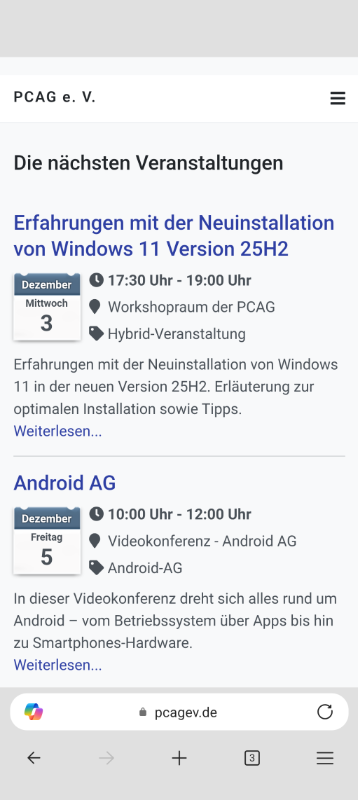
We just migrated from Joomla 3! to Joomla 5 and from Matukio to JEM - was some work. Migration to 4.4.0 could be in April.
Thanks to the support of this community the event page looks good on desktop and smartphone and can stay for a while.
We just migrated from Joomla 3! to Joomla 5 and from Matukio to JEM - was some work. Migration to 4.4.0 could be in April.
Thanks to the support of this community the event page looks good on desktop and smartphone and can stay for a while.
Please Log in or Create an account to join the conversation.
Time to create page: 0.584 seconds