
help to better help you:
Please: add always Joomla / JEM version and details to your posts, so we can try to reproduce your issue!
Event Status in Weekcal


Event Status in Weekcal
1 week 4 days ago
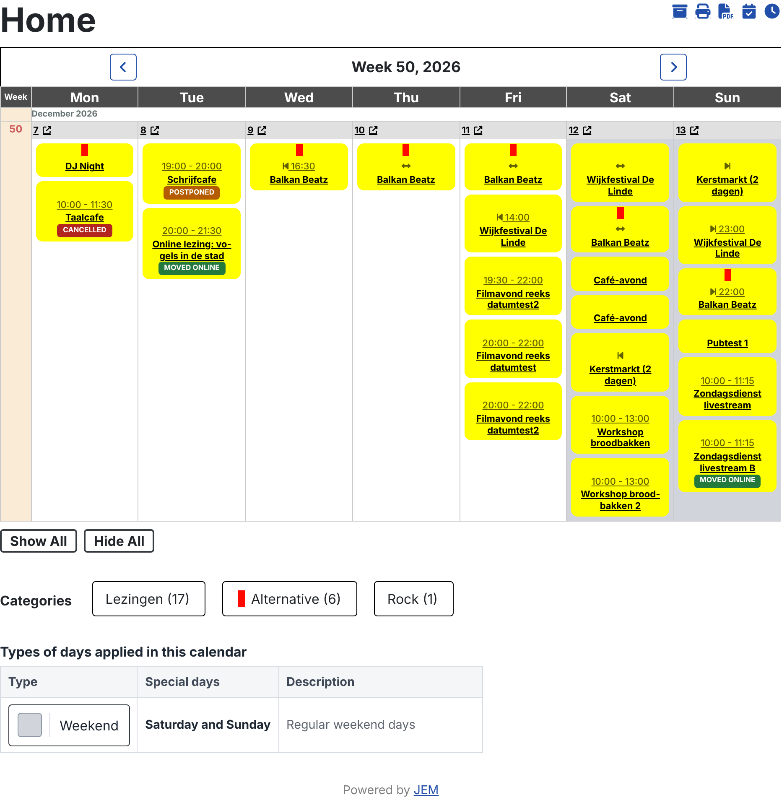
Hi, I've a question about the weekcal menu item : Is there an option anywhere to display an event status i.e. Cancelled / Postponed the same way that the Teaser Module does ?
I'm not particularly bothered about it showing Scheduled, just those that may have been on the list and then moved... I know that to unpublish will not display them and that clicking on the item will take you to it's page where status is displayed,
Thanks.
Please Log in or Create an account to join the conversation.


Re: Event Status in Weekcal
1 week 4 days ago - 1 week 4 days ago
Hi, Short answer: no, there is currently no option for this in the week calendar (or the monthly and year calendar). The menu option *Show status indicators* only exists for the list-type views (category, day, events list and blog, search, venue, types).
The calendar views only show the published/unpublished icon. You can get it with a small template override, though. It uses the same status badge as the Teaser module, with the same colours from *JEM Settings → Basic → Module status*.
Only Cancelled, Postponed, Rescheduled and Moved online get a badge; normal (scheduled) events stay as they are.
**1. Create the override** Copy `components/com_jem/views/weekcal/tmpl/responsive/default.php` to `templates/YOUR_TEMPLATE/html/com_jem/weekcal/responsive/default.php` (If your JEM layout style is not "responsive", use `views/weekcal/tmpl/default.php` and `html/com_jem/weekcal/default.php` instead. The edits are the same.)
**2. Find this line** (about 80 to 130 lines down): ```phpforeach ($this->rows as $row) :``` and add these lines directly **above** it: ```php// Show event status badges (Cancelled, Postponed, Rescheduled, Moved online)JemOutput::prepareModuleEventStatuses($this->rows);JemHelper::loadModuleStatusAssets();\Joomla\CMS\Factory::getApplication()->getDocument()->getWebAssetManager()->addInlineStyle( 'div#jem .eventcontentinner .jem-module-event-status-badge{color:var(--jem-module-status-color,#fff) !important;margin-inline-start:0;}');``` (The inline style is needed because the calendar stylesheet forces the text colour of every span in the calendar cell, which would make the badge text black.)
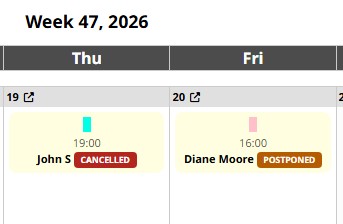
**3. Find this line** (further down, in the same loop): ```php$content .= JemHelper::caltooltip($catname.$eventname.$timehtml.$venue.$contact.$eventstate, $eventdate, $row->title . $statusicon, $detaillink, 'editlinktip hasTip', $timetp, $category->color);``` and replace it with: ```php$statusBadge = '';if (in_array($row->module_event_status ?? '', array('cancelled', 'postponed', 'rescheduled', 'moved_online'), true)) { $statusBadge = ' ' . JemOutput::moduleEventStatusBadge($row);}$content .= JemHelper::caltooltip($catname.$eventname.$timehtml.$venue.$contact.$eventstate, $eventdate, $row->title . $statusicon . $statusBadge, $detaillink, 'editlinktip hasTip', $timetp, $category->color);``` If you only want Cancelled and Postponed, remove `'rescheduled'` and `'moved_online'` from the list. The result looks like the attached screenshot: the badge appears under the title in the calendar cell.
**Note for JEM 5.0.2 RC4 / 5.1.0 beta 7 testers:** in those test versions, the weekcal template contains this line near the top: ```phprequire_once __DIR__ . '/../../../../helpers/calendardaylink.php';``` In an override that path is wrong and the page gives an error 500. Change it to: ```phprequire_once JPATH_SITE . '/components/com_jem/helpers/calendardaylink.php';``` On 5.0.1 that line does not exist and nothing needs to be changed ther
Remember that an override is not updated with JEM: after a JEM update, compare your override with the new core file. Tested on JEM 5.0.2 RC4 and 5.1.0 beta 7 (Joomla 6.1, Cassiopeia, responsive layout).
JEM 5.1.0 + Joomla 6
Last edit: 1 week 4 days ago by Bluefox.
Please Log in or Create an account to join the conversation.
Re: Event Status in Weekcal
1 week 3 days ago
Thank you, I've created the override, found the foreach at line 127 and tried to add the lines above it but it isn't working correctly with a copy/paste from your text, I've attempted the line breaks but failed. 😢
Is it possible you can edit or post again using the (code)(/code) function.please? Replacing () with square brackets or the </> icon above, but I'm sure you knew that haha. 😍
Please Log in or Create an account to join the conversation.
Re: Event Status in Weekcal
1 week 2 days ago - 1 week 2 days ago
here it is again with code tags. Your foreach is at line 127, so you are on one of the newer test versions. That means there are three changes in your override file. Each one is a simple find-and-replace, so you don't need to add line breaks yourself.
Change 1 (near the top, around line 19-20)
Find this line:
(It may have three ../ instead of four, depending on the layout.) Replace the whole line with:
Without this change the override gives an error 500 (a known issue, reported to the developers).
Change 2 (around line 124-127)
Find this line:
Put your cursor at the very start of that line, press Enter once to make an empty line above it, and paste this into the empty line:
It is deliberately one long line, so it does not matter how the forum or your editor wraps it.
Change 3 (around line 462-465)
Find this line:
Replace the whole line with:
Again one line on purpose.
Save the file and reload the week calendar. Cancelled, postponed, rescheduled and moved-online events now get a coloured badge under the title, and normal events stay as they are. If you only want Cancelled and Postponed, change array('cancelled', 'postponed', 'rescheduled', 'moved_online') in change 3 into array('cancelled', 'postponed').
If the page goes white or shows an error, check change 1 first, and make sure that each pasted line ends with the ; and nothing got cut off.
//
it seems the code formatter here in the forum does not display things nicely. Here with copy/paste in notepad and then copy/paste here in the forum:
Change 1 (near the top, around line 19-20)
Find this line:
Code:
require_once DIR . '/../../../../helpers/calendardaylink.php';
(It may have three ../ instead of four, depending on the layout.) Replace the whole line with:
Code:
require_once JPATH_SITE . '/components/com_jem/helpers/calendardaylink.php';
Without this change the override gives an error 500 (a known issue, reported to the developers).
Change 2 (around line 124-127)
Find this line:
Code:
foreach ($this->rows as $row) :
Put your cursor at the very start of that line, press Enter once to make an empty line above it, and paste this into the empty line:
Code:
JemOutput::prepareModuleEventStatuses($this->rows); JemHelper::loadModuleStatusAssets(); \Joomla\CMS\Factory::getApplication()->getDocument()->getWebAssetManager()->addInlineStyle('div#jem .eventcontentinner .jem-module-event-status-badge{color:var(--jem-module-status-color,#fff) !important;margin-inline-start:0;}');
It is deliberately one long line, so it does not matter how the forum or your editor wraps it.
Change 3 (around line 462-465)
Find this line:
Code:
$content .= JemHelper::caltooltip($catname.$eventname.$timehtml.$venue.$contact.$eventstate, $eventdate, $row->title . $statusicon, $detaillink, 'editlinktip hasTip', $timetp, $category->color);
Replace the whole line with:
Code:
$statusBadge = in_array($row->module_event_status['status'] ?? '', array('cancelled', 'postponed', 'rescheduled', 'moved_online'), true) ? ' ' . JemOutput::moduleEventStatusBadge($row) : ''; $content .= JemHelper::caltooltip($catname.$eventname.$timehtml.$venue.$contact.$eventstate, $eventdate, $row->title . $statusicon . $statusBadge, $detaillink, 'editlinktip hasTip', $timetp, $category->color);
Again one line on purpose.
Save the file and reload the week calendar. Cancelled, postponed, rescheduled and moved-online events now get a coloured badge under the title, and normal events stay as they are. If you only want Cancelled and Postponed, change array('cancelled', 'postponed', 'rescheduled', 'moved_online') in change 3 into array('cancelled', 'postponed').
If the page goes white or shows an error, check change 1 first, and make sure that each pasted line ends with the ; and nothing got cut off.
//
it seems the code formatter here in the forum does not display things nicely. Here with copy/paste in notepad and then copy/paste here in the forum:
JEM 5.1.0 + Joomla 6
Last edit: 1 week 2 days ago by Bluefox.
Please Log in or Create an account to join the conversation.
Re: Event Status in Weekcal
1 week 4 hours ago
Thanks Bluefox, that works perfectly, I didn't need the line
(it creashed as you expected) - I'm on the latest Beta and a test site but what I wanted and you coded is correct. If this could be incorporated into the next release it would be great.
Best regards,
Digglez
Code:
require_once DIR . '/../../../../helpers/calendardaylink.php';
(it creashed as you expected) - I'm on the latest Beta and a test site but what I wanted and you coded is correct. If this could be incorporated into the next release it would be great.
Best regards,
Digglez
Please Log in or Create an account to join the conversation.


Re: Event Status in Weekcal
1 week 4 hours ago
Hi digby,
This is already included in JEM 5.0.2 RC5 and 5.1.0 beta 8. I have checked both packages: Week Calendar supports event status labels, including Cancelled and Postponed, without modifying the layout.
Please check Menus → your Week Calendar menu item → Options → Show status indicators → Yes. The general Show status indicators setting must also be enabled in JEM Settings → Basic, with the statuses you want to display.
If you have a template override, please test with the original JEM layout, as an older override may not include this functionality.
Thank you both for testing and sharing the solution. Please let us know whether it works with the original layout and these settings.
At the end of the day, computing and technology, like Joomla and JEM are here to help the end user and make our lives a little easier. Help us to be better.
Please Log in or Create an account to join the conversation.
Time to create page: 0.497 seconds