
help to better help you:
Please: add always Joomla / JEM version and details to your posts, so we can try to reproduce your issue!
[SOLVED] 5.0.2 RC2 - Installation error


5.0.2 RC2 - Installation error
17 hours 17 minutes ago - 17 hours 11 minutes ago
When installing JEM 5.0.2 RC2 on Joomla 6.1.4, PHP 8.4.27. JEM 5.0.1 I get the error:
JInstaller: :Install: Error SQL You have an error in your SQL syntax; check the manual that corresponds to your MySQL server version for the right syntax to use near 'CURRENT_TIMESTAMP' at line 1
Extension installation stopped.
Package Update: There was an error installing an extension: com_jem.zip
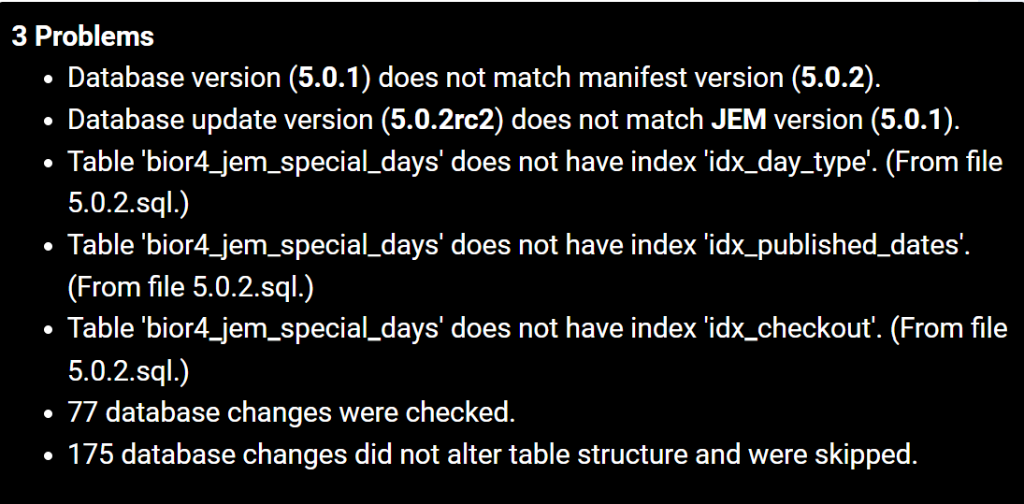
In Joomla -> System -> Database there are 3 JEM errors
JInstaller: :Install: Error SQL You have an error in your SQL syntax; check the manual that corresponds to your MySQL server version for the right syntax to use near 'CURRENT_TIMESTAMP' at line 1
Extension installation stopped.
Package Update: There was an error installing an extension: com_jem.zip
In Joomla -> System -> Database there are 3 JEM errors
Last edit: 17 hours 11 minutes ago by hklages.
Please Log in or Create an account to join the conversation.


Re: 5.0.2 RC2 - Installation error
16 hours 27 minutes ago
Thanks for the report. The cause is one line in the 5.0.2 update script of RC2 (admin/sql/updates/mysql/5.0.2.sql, line 16):
ALTER TABLE `#__jem_special_days` ALTER COLUMN `created` SET DEFAULT CURRENT_TIMESTAMP;
MariaDB accepts this, but MySQL does not: for ALTER COLUMN ... SET DEFAULT, MySQL only allows a literal or an expression in parentheses. Your message says "MySQL server version", so you are on MySQL. Because the update stops at that line, the three ADD INDEX statements after it are not executed, which are the three errors you see under System > Database.
The likely fix is to write it as SET DEFAULT (CURRENT_TIMESTAMP). I have reported it on GitHub so it can be corrected in the package:
github.com/jemproject/JEM-Project/issues/2417
ALTER TABLE `#__jem_special_days` ALTER COLUMN `created` SET DEFAULT CURRENT_TIMESTAMP;
MariaDB accepts this, but MySQL does not: for ALTER COLUMN ... SET DEFAULT, MySQL only allows a literal or an expression in parentheses. Your message says "MySQL server version", so you are on MySQL. Because the update stops at that line, the three ADD INDEX statements after it are not executed, which are the three errors you see under System > Database.
The likely fix is to write it as SET DEFAULT (CURRENT_TIMESTAMP). I have reported it on GitHub so it can be corrected in the package:
github.com/jemproject/JEM-Project/issues/2417
JEM 5.1.0 + Joomla 6
Please Log in or Create an account to join the conversation.


Re: 5.0.2 RC2 - Installation error
15 hours 55 minutes ago
Thank you for reporting this. I reproduced the installation error on MySQL. One SQL statement stopped the update before the remaining database changes could run. This explains the missing indexes and the version mismatch in your screenshot.
The SQL is now corrected in the refreshed JEM 5.0.2 RC2 package, dated 31 October 2026, 10:42 (Madrid time). The clean-install SQL and upgrade paths were checked on MySQL and MariaDB.
Please restore your test site to its original working JEM 5.0.1 installation, or the supported 4.x version you started from, including both files and database. Then download the refreshed RC2 package and run the update again. Please do not use the partially updated installation for this test.
Afterwards, check System → Maintenance → Database and open the JEM frontend. Please let us know whether the update completes without errors. Thank you for testing.
Download from: www.joomlaeventmanager.net/download/beta-versions
The SQL is now corrected in the refreshed JEM 5.0.2 RC2 package, dated 31 October 2026, 10:42 (Madrid time). The clean-install SQL and upgrade paths were checked on MySQL and MariaDB.
Please restore your test site to its original working JEM 5.0.1 installation, or the supported 4.x version you started from, including both files and database. Then download the refreshed RC2 package and run the update again. Please do not use the partially updated installation for this test.
Afterwards, check System → Maintenance → Database and open the JEM frontend. Please let us know whether the update completes without errors. Thank you for testing.
Download from: www.joomlaeventmanager.net/download/beta-versions
At the end of the day, computing and technology, like Joomla and JEM are here to help the end user and make our lives a little easier. Help us to be better.
Please Log in or Create an account to join the conversation.
Re: [SOLVED] 5.0.2 RC2 - Installation error
15 hours 13 minutes ago
Solved with todays 2026-10-31 version - no installation errors, no database erros!
Please Log in or Create an account to join the conversation.
Re: [SOLVED] 5.0.2 RC2 - Installation error
15 hours 4 minutes ago
Thanks for your testing.
At the end of the day, computing and technology, like Joomla and JEM are here to help the end user and make our lives a little easier. Help us to be better.
Please Log in or Create an account to join the conversation.
Time to create page: 0.549 seconds