
help to better help you:
Please: add always Joomla / JEM version and details to your posts, so we can try to reproduce your issue!
[SOLVED] Changing format for date is not accepted


Re: Changing format for date is not accepted
2 months 2 weeks ago - 2 months 2 weeks ago
For JEM 4.5.0 RC4 on Joomla 5, the Database Check may show:
Database Version: 5.0.0
Manifest Version: 4.5.0rc4
This happens because the JEM 4.5.0 RC4 package accidentally included the update file:administrator/components/com_jem/sql/updates/mysql/5.0.0.sql Joomla detects update SQL files in that folder and can therefore register the JEM database schema as 5.0.0, even though the installed component is still 4.5.0rc4.
Manual fix for an affected JEM 4.5.0 RC4 / Joomla 5 installation
SELECT extension_id, name, element
FROM #__extensions
WHERE type = 'component'
AND element = 'com_jem';
UPDATE #__schemas
SET version_id = '4.5.0'
WHERE extension_id = (
SELECT extension_id
FROM #__extensions
WHERE type = 'component'
AND element = 'com_jem'
);
Replace #__ with your Joomla database prefix.
Then run Check / Update Structure.After that, JEM should show the database schema as 4.5.0, matching the JEM 4.5.0 RC4 installation path.
This will be fixed in the next refreshed RC4 package, where the 5.0.0.sql update file will no longer be included in the JEM 4.5.0 package.
Database Version: 5.0.0
Manifest Version: 4.5.0rc4
This happens because the JEM 4.5.0 RC4 package accidentally included the update file:administrator/components/com_jem/sql/updates/mysql/5.0.0.sql Joomla detects update SQL files in that folder and can therefore register the JEM database schema as 5.0.0, even though the installed component is still 4.5.0rc4.
Manual fix for an affected JEM 4.5.0 RC4 / Joomla 5 installation
- Remove this file from the installed site if it exists:
- Find the JEM component extension id:
SELECT extension_id, name, element
FROM #__extensions
WHERE type = 'component'
AND element = 'com_jem';
- Reset the JEM schema version back to the correct 4.5 schema version:
UPDATE #__schemas
SET version_id = '4.5.0'
WHERE extension_id = (
SELECT extension_id
FROM #__extensions
WHERE type = 'component'
AND element = 'com_jem'
);
Replace #__ with your Joomla database prefix.
- Go to: System > Maintenance > Database
Then run Check / Update Structure.After that, JEM should show the database schema as 4.5.0, matching the JEM 4.5.0 RC4 installation path.
This will be fixed in the next refreshed RC4 package, where the 5.0.0.sql update file will no longer be included in the JEM 4.5.0 package.
At the end of the day, computing and technology, like Joomla and JEM are here to help the end user and make our lives a little easier. Help us to be better.
Last edit: 2 months 2 weeks ago by McKillo.
The following user(s) said Thank You: hklages
Please Log in or Create an account to join the conversation.


Re: Changing format for date is not accepted
2 months 2 weeks ago
Thanks!
I now work with ZFS snapshots and can restore a previous state of the VM in a few minutes.
So I am going to wait for the next rc4 refresh and install that.
I now work with ZFS snapshots and can restore a previous state of the VM in a few minutes.
So I am going to wait for the next rc4 refresh and install that.
Please Log in or Create an account to join the conversation.
Re: Changing format for date is not accepted
2 months 2 weeks ago - 2 months 2 weeks ago
Here you are. New RC4 zip file update [02.07.2026 12:30]:
JEM 5.0.0 rc4 for Joomla 6:
github.com/jemproject/JEM-Project/blob/JEM-5.0.0-dev-beta1-from-4.5.0/pkg_jem_v5.0.0rc4.zip
JEM 4.5.0 rc4 for Joomla 5:
github.com/jemproject/JEM-Project/blob/JEM-4.5.0-dev-bugfix-newfeatures/pkg_jem_v4.5.0rc4.zip
JEM 5.0.0 rc4 for Joomla 6:
github.com/jemproject/JEM-Project/blob/JEM-5.0.0-dev-beta1-from-4.5.0/pkg_jem_v5.0.0rc4.zip
JEM 4.5.0 rc4 for Joomla 5:
github.com/jemproject/JEM-Project/blob/JEM-4.5.0-dev-bugfix-newfeatures/pkg_jem_v4.5.0rc4.zip
At the end of the day, computing and technology, like Joomla and JEM are here to help the end user and make our lives a little easier. Help us to be better.
Last edit: 2 months 2 weeks ago by McKillo.
Please Log in or Create an account to join the conversation.
Re: Changing format for date is not accepted
2 months 2 weeks ago - 2 months 2 weeks ago
Updating from joomla 5.4.6 and jem 4.4.2 to to new 4.5.0 rc4 at 2026-07-02 1309 provides an error message but after applying system maintenance/database update structure solves the issues.
The update check does not show the 4.5 rc..
BUT: Now again i am not able to change anything in the settings page for the event - as stated at the top of this issue.

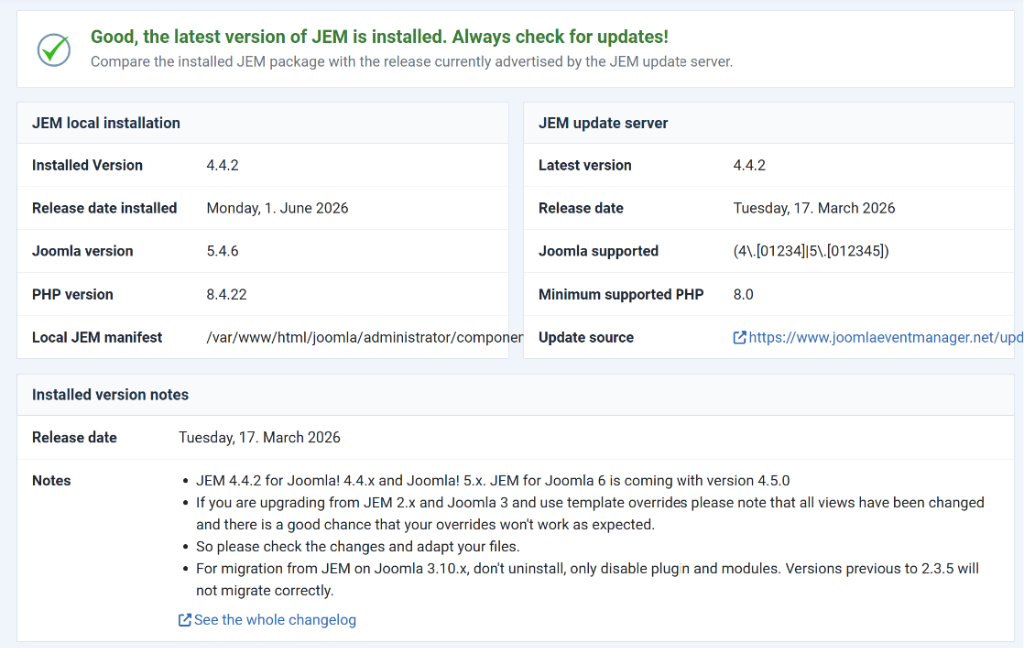
The update check does not show the 4.5 rc..
BUT: Now again i am not able to change anything in the settings page for the event - as stated at the top of this issue.
Last edit: 2 months 2 weeks ago by hklages.
Please Log in or Create an account to join the conversation.
Re: Changing format for date is not accepted
2 months 2 weeks ago
Could you tell me which database and version you are using?
At the end of the day, computing and technology, like Joomla and JEM are here to help the end user and make our lives a little easier. Help us to be better.
Please Log in or Create an account to join the conversation.
Re: Changing format for date is not accepted
2 months 2 weeks ago - 2 months 2 weeks ago
How to debug the “Illegal mix of collations” error during JEM update
If the update from JEM 4.4.2 to JEM 4.5.0 RC4 stops with an error like:
JInstaller: :Install: Error SQL Illegal mix of collations
(utf8mb4_0900_ai_ci,IMPLICIT) and (utf8mb4_unicode_ci,IMPLICIT)
please check the collation of the affected JEM tables before changing anything.
Replace xxxxx_ with your Joomla database prefix and run:
SELECT TABLE_SCHEMA, TABLE_NAME, COLUMN_NAME, COLLATION_NAME
FROM information_schema.COLUMNS
WHERE TABLE_NAME LIKE '%jem%'
AND COLLATION_NAME IS NOT NULL
ORDER BY TABLE_SCHEMA, TABLE_NAME, COLUMN_NAME;
If possible, also report your database version:
SELECT VERSION();
If the update from JEM 4.4.2 to JEM 4.5.0 RC4 stops with an error like:
JInstaller: :Install: Error SQL Illegal mix of collations
(utf8mb4_0900_ai_ci,IMPLICIT) and (utf8mb4_unicode_ci,IMPLICIT)
please check the collation of the affected JEM tables before changing anything.
Replace xxxxx_ with your Joomla database prefix and run:
SELECT TABLE_SCHEMA, TABLE_NAME, COLUMN_NAME, COLLATION_NAME
FROM information_schema.COLUMNS
WHERE TABLE_NAME LIKE '%jem%'
AND COLLATION_NAME IS NOT NULL
ORDER BY TABLE_SCHEMA, TABLE_NAME, COLUMN_NAME;
If possible, also report your database version:
SELECT VERSION();
At the end of the day, computing and technology, like Joomla and JEM are here to help the end user and make our lives a little easier. Help us to be better.
Last edit: 2 months 2 weeks ago by McKillo.
Please Log in or Create an account to join the conversation.
Time to create page: 0.810 seconds