
help to better help you:
Please: add always Joomla / JEM version and details to your posts, so we can try to reproduce your issue!
JEM Basic Module - Event Display Issue


JEM Basic Module - Event Display Issue
1 day 2 hours ago - 1 day 2 hours ago
I discovered an error in how events are displayed.
Joomla 5.4.x - 6.2
JEM 5.01
When I open an event from the JEM - Simple List menu, the event displays correctly—see the first image 01.jpg
But when I open the same event from the JEM - Basic Module, it displays incorrectly... it shows the Venue, etc... see the second image 02_error.jpg
I figured out that everything displays correctly up to JEM version 5.0, but starting with version 5.01, it displays incorrectly.
So now I have JEM 5.0 on my website, but I’ve heard it has some kind of vulnerability...
Are you aware of this bug?
Joomla 5.4.x - 6.2
JEM 5.01
When I open an event from the JEM - Simple List menu, the event displays correctly—see the first image 01.jpg
But when I open the same event from the JEM - Basic Module, it displays incorrectly... it shows the Venue, etc... see the second image 02_error.jpg
I figured out that everything displays correctly up to JEM version 5.0, but starting with version 5.01, it displays incorrectly.
So now I have JEM 5.0 on my website, but I’ve heard it has some kind of vulnerability...
Are you aware of this bug?
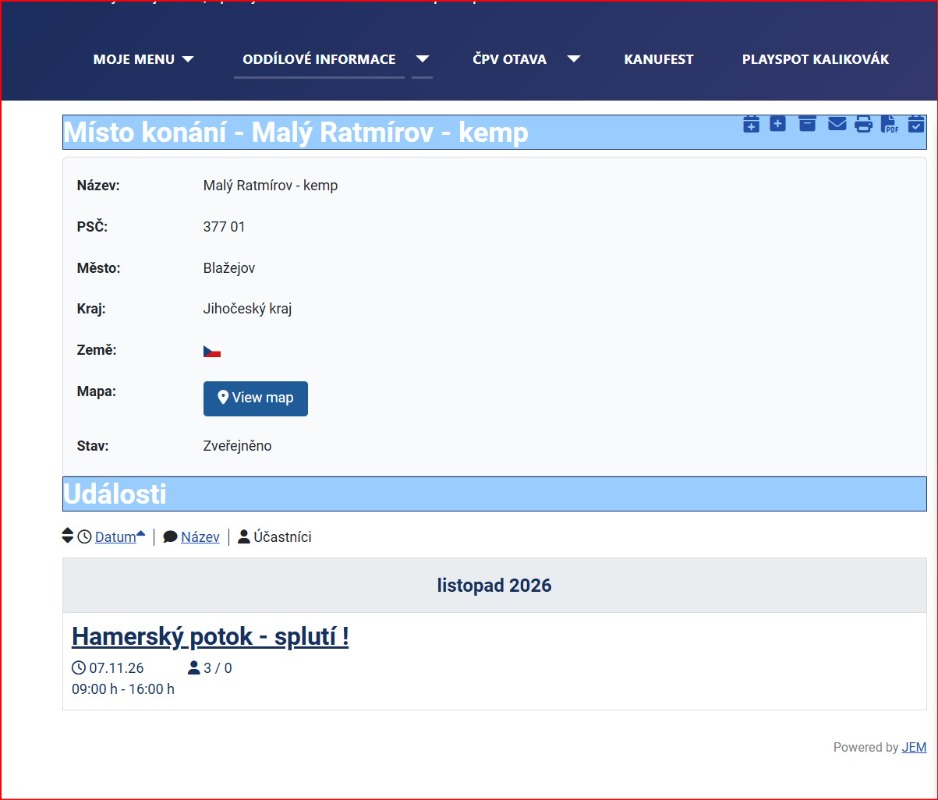
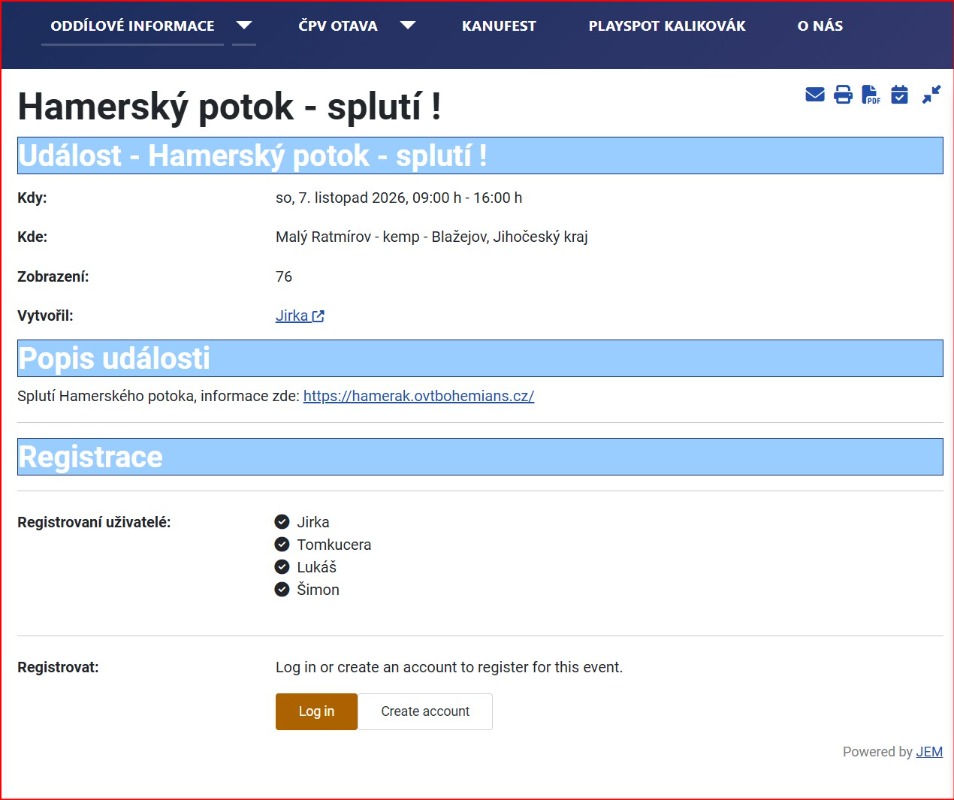
Last edit: 1 day 2 hours ago by Kralyk.
Please Log in or Create an account to join the conversation.


Re: JEM Basic Module - Event Display Issue
1 day 27 minutes ago - 1 day 22 minutes ago
Hi Kralyk,
Thanks for the report. I could not reproduce this on a clean JEM 5.0.1 (Joomla 6, SEF on): links in the Basic module open the event in all layouts. To narrow it down, could you post:
// it seems to be releated to the override
Thanks for the report. I could not reproduce this on a clean JEM 5.0.1 (Joomla 6, SEF on): links in the Basic module open the event in all layouts. To narrow it down, could you post:
- The exact URL of an event link in the Basic module (hover over it or copy the link), and the URL you end up on. => You can remove the first part (your domain) for privacy concerns
- The module settings: layout, “Link to event”, “Show title” / “Show venue”, “Link to venue”, and the “Event/Venue block layout” options.
- JEM Settings → “Default Menu Itemid”: is it set, and to which menu item?
- Which JEM menu items you have (especially single-event, single-venue and calendar items), and on which page the module is shown.
- Whether your template has overrides in
orCode:templates/<your template>/html/mod_jem/. If so, please test once with the override renamed.Code:html/com_jem/
// it seems to be releated to the override
JEM 5.1.0 + Joomla 6
Last edit: 1 day 22 minutes ago by Bluefox.
Please Log in or Create an account to join the conversation.
Re: JEM Basic Module - Event Display Issue
1 day 14 minutes ago - 1 day 12 minutes ago
Thanks for the report, I could reproduce it.
**Cause:** the update to JEM 5.0.1 converts the old Basic module option "Show title or venue" (`showtitloc`) into the new options "Show title" and "Show venue", and removes the old one. If your template has an **override** of the Basic module that was made for JEM 4.x or 5.0, that override still reads the old option. It no longer finds it, so it shows the venue and links to the venue page instead of the event. JEM's own layouts are not affected, which is why it only happens on some sites.
**Workaround (you can stay on JEM 5.0.1):**
1. Check your template folder for `templates/<your template>/html/mod_jem/`.
2. Rename or remove that folder (or the layout file your module uses) and reload the page. The module links should open the event again.
3. If you need your own styling, create a new override from the current module layout (System → Site Templates → your template → Create Overrides → Modules → mod_jem) and apply your changes there.
Please do not stay on JEM 5.0: 5.0.1 contains security-related access-control fixes. like github.com/jemproject/JEM-Project/issues/2281 but also others. McKillo can tell more about it.
I have reported your issue on GitHub with a fix, so that old overrides keep working after the update. github.com/jemproject/JEM-Project/issues/2497
**Cause:** the update to JEM 5.0.1 converts the old Basic module option "Show title or venue" (`showtitloc`) into the new options "Show title" and "Show venue", and removes the old one. If your template has an **override** of the Basic module that was made for JEM 4.x or 5.0, that override still reads the old option. It no longer finds it, so it shows the venue and links to the venue page instead of the event. JEM's own layouts are not affected, which is why it only happens on some sites.
**Workaround (you can stay on JEM 5.0.1):**
1. Check your template folder for `templates/<your template>/html/mod_jem/`.
2. Rename or remove that folder (or the layout file your module uses) and reload the page. The module links should open the event again.
3. If you need your own styling, create a new override from the current module layout (System → Site Templates → your template → Create Overrides → Modules → mod_jem) and apply your changes there.
Please do not stay on JEM 5.0: 5.0.1 contains security-related access-control fixes. like github.com/jemproject/JEM-Project/issues/2281 but also others. McKillo can tell more about it.
I have reported your issue on GitHub with a fix, so that old overrides keep working after the update. github.com/jemproject/JEM-Project/issues/2497
JEM 5.1.0 + Joomla 6
Last edit: 1 day 12 minutes ago by Bluefox.
The following user(s) said Thank You: Kralyk
Please Log in or Create an account to join the conversation.
Re: JEM Basic Module - Event Display Issue
5 hours 18 minutes ago
Thank you for the advice.
My test:
I renamed the `templates/<your template>/html/mod_jem/` folder (which removed the override).
Everything has been working fine ever since. Events from links in the module are displayed correctly.
Thank you very much again.
My test:
I renamed the `templates/<your template>/html/mod_jem/` folder (which removed the override).
Everything has been working fine ever since. Events from links in the module are displayed correctly.
Thank you very much again.
Please Log in or Create an account to join the conversation.
Time to create page: 0.560 seconds