
help to better help you:
Please: add always Joomla / JEM version and details to your posts, so we can try to reproduce your issue!
Update JEM 4.4.1 to JEM 5.0


Update JEM 4.4.1 to JEM 5.0
3 months 1 week ago
Ich erhielt heute eine Meldung, dass es ein Update für JEM gibt.Als ich dieses gestartet hatte, bekam ich folgende Fehlermeldung.
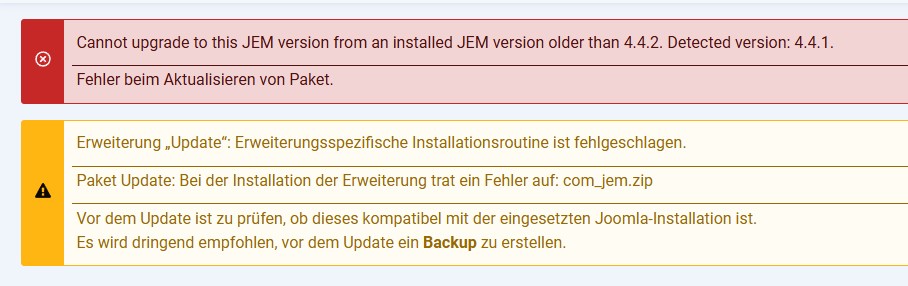 Meine Frage:Muss ich zuerst JEM 4.4.2 installieren um auf JEM 5.0 upgraden zu können oder kann ich die Version 5.0 herunterladen und per Hand installieren?Falls ich 4.4.2 zuerst installieren muss, wo kann ich diese Version noch finden?
Vielen Dank im Voraus für Eure Hilfe.
I received a notification today that there is an update for JEM.
When I started the update, I got the following error message.
My question:
Do I need to install JEM 4.4.2 first in order to upgrade to JEM 5.0, or can I download version 5.0 and install it manually?
If I need to install 4.4.2 first, where can I still find that version?
Thanks in advance for your help.
Vielen Dank im Voraus für Eure Hilfe.
I received a notification today that there is an update for JEM.
When I started the update, I got the following error message.
My question:
Do I need to install JEM 4.4.2 first in order to upgrade to JEM 5.0, or can I download version 5.0 and install it manually?
If I need to install 4.4.2 first, where can I still find that version?
Thanks in advance for your help.
Please Log in or Create an account to join the conversation.


Re: Update JEM 4.4.1 to JEM 5.0
3 months 1 week ago - 3 months 1 week ago
Upgrading from JEM 4.4.2 or JEM 4.5.0 to JEM 5.0.0 is supported.
A direct upgrade from a JEM version older than 4.4.2 to JEM 5.0.0 is not supported and will be blocked.
If you are using a version older than JEM 4.4.2, first upgrade to either JEM 4.4.2 or JEM 4.5.0. Verify that the website and database work correctly, and then upgrade to JEM 5.0.0.
A fresh installation of JEM 5.0.0 is also supported.
More info: www.joomlaeventmanager.net/documentation/basics/system-requirements
A direct upgrade from a JEM version older than 4.4.2 to JEM 5.0.0 is not supported and will be blocked.
If you are using a version older than JEM 4.4.2, first upgrade to either JEM 4.4.2 or JEM 4.5.0. Verify that the website and database work correctly, and then upgrade to JEM 5.0.0.
A fresh installation of JEM 5.0.0 is also supported.
More info: www.joomlaeventmanager.net/documentation/basics/system-requirements
At the end of the day, computing and technology, like Joomla and JEM are here to help the end user and make our lives a little easier. Help us to be better.
Last edit: 3 months 1 week ago by McKillo.
The following user(s) said Thank You: Kurtus
Please Log in or Create an account to join the conversation.
Re: Update JEM 4.4.1 to JEM 5.0
3 months 1 week ago - 3 months 1 week ago
Thanks for the tip.
I'll download JEM 4.5.0 and install it manually.
After that, I'll apply the update to JEM 5.0.0 offered in the Joomla dashboard.
UPDATE:
When I tried to install JEM 4.5.0 I received this error message:
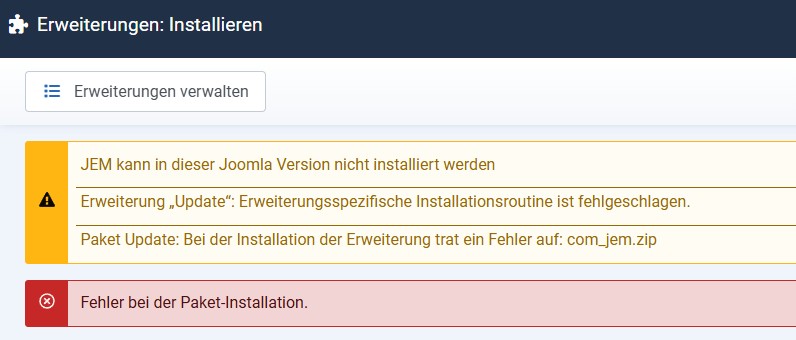
I am using Joomla V. 6.1.2
I could not find a download link for JEM 4.4.2
Can I manually install JEM 5.0 using a package file without running into any problems?
I'll download JEM 4.5.0 and install it manually.
After that, I'll apply the update to JEM 5.0.0 offered in the Joomla dashboard.
UPDATE:
When I tried to install JEM 4.5.0 I received this error message:
I am using Joomla V. 6.1.2
I could not find a download link for JEM 4.4.2
Can I manually install JEM 5.0 using a package file without running into any problems?
Last edit: 3 months 1 week ago by Kurtus.
Please Log in or Create an account to join the conversation.


Re: Update JEM 4.4.1 to JEM 5.0
3 months 1 week agoPlease Log in or Create an account to join the conversation.
Re: Update JEM 4.4.1 to JEM 5.0
3 months 1 week ago - 3 months 1 week ago
You have a problem:
Manual Solution:So now you need to start over on a local server or another server. Restore a backup of Joomla 5.4 with PHP 8.3/8.4 and JEM 4.4.1. Then migrate to JEM 4.5.0, and after that, update to JEM 5.0.0. Use phpMyAdmin to export all the JEM tables. Then go to your Joomla 6.1 installation, delete all existing JEM tables i your database, import the exported tables, and reinstall JEM 5.0.0 on Joomla 6.1.
That way, you won't lose your data and the JEM data structure will be migrated correctly across versions.
- JEM 4.4.2 won't install on Joomla 6, so you can't update from 4.4.1.
- JEM 4.5.0 installs on Joomla 6, but it doesn't upgrade from 4.4.1.
- JEM 5.0.0 can't update from 4.4.1 either – you need JEM 4.5.0 first.
Manual Solution:So now you need to start over on a local server or another server. Restore a backup of Joomla 5.4 with PHP 8.3/8.4 and JEM 4.4.1. Then migrate to JEM 4.5.0, and after that, update to JEM 5.0.0. Use phpMyAdmin to export all the JEM tables. Then go to your Joomla 6.1 installation, delete all existing JEM tables i your database, import the exported tables, and reinstall JEM 5.0.0 on Joomla 6.1.
That way, you won't lose your data and the JEM data structure will be migrated correctly across versions.
At the end of the day, computing and technology, like Joomla and JEM are here to help the end user and make our lives a little easier. Help us to be better.
Last edit: 3 months 1 week ago by McKillo.
The following user(s) said Thank You: Kurtus
Please Log in or Create an account to join the conversation.
Re: Update JEM 4.4.1 to JEM 5.0
3 months 1 week ago - 3 months 1 week ago
New issue is open:
github.com/jemproject/JEM-Project/issues/2247
You can test a JEM 5.0.1 beta 1, donwload from:
github.com/jemproject/JEM-Project/blob/5.0.1-bugfixes/pkg_jem_v5.0.1beta1.zip
Please Test it and tell me if it works
github.com/jemproject/JEM-Project/issues/2247
You can test a JEM 5.0.1 beta 1, donwload from:
github.com/jemproject/JEM-Project/blob/5.0.1-bugfixes/pkg_jem_v5.0.1beta1.zip
Please Test it and tell me if it works
At the end of the day, computing and technology, like Joomla and JEM are here to help the end user and make our lives a little easier. Help us to be better.
Last edit: 3 months 1 week ago by McKillo.
The following user(s) said Thank You: Kurtus
Please Log in or Create an account to join the conversation.
Time to create page: 0.652 seconds